فصل 4.8.
پرسوجوهای SQL چند رکوردی
در نهایت بیایید به الگوی اجرای دستورات SQL که چندین ردیف برمیگردانند نگاه کنیم. من این را با بهروزرسانی متد SnippetModel.Latest() برای برگرداندن ده snippet اخیراً ایجاد شده (تا زمانی که منقضی نشدهاند) با استفاده از پرسوجوی SQL زیر نشان میدهم:
SELECT id, title, content, created, expires FROM snippets
WHERE expires > UTC_TIMESTAMP() ORDER BY id DESC LIMIT 10
فایل internal/models/snippets.go را باز کنید و کد زیر را اضافه کنید:
package models

...

func (m *SnippetModel) Latest() ([]Snippet, error) {
    // Write the SQL statement we want to execute.
    stmt := `SELECT id, title, content, created, expires FROM snippets
    WHERE expires > UTC_TIMESTAMP() ORDER BY id DESC LIMIT 10`

    // Use the Query() method on the connection pool to execute our
    // SQL statement. This returns a sql.Rows resultset containing the result of
    // our query.
    rows, err := m.DB.Query(stmt)
    if err != nil {
        return nil, err
    }

    // We defer rows.Close() to ensure the sql.Rows resultset is
    // always properly closed before the Latest() method returns. This defer
    // statement should come *after* you check for an error from the Query()
    // method. Otherwise, if Query() returns an error, you'll get a panic
    // trying to close a nil resultset.
    defer rows.Close()

    // Initialize an empty slice to hold the Snippet structs.
    var snippets []Snippet

    // Use rows.Next to iterate through the rows in the resultset. This
    // prepares the first (and then each subsequent) row to be acted on by the
    // rows.Scan() method. If iteration over all the rows completes then the
    // resultset automatically closes itself and frees-up the underlying
    // database connection.
    for rows.Next() {
        // Create a new zeroed Snippet struct.
        var s Snippet
        // Use rows.Scan() to copy the values from each field in the row to the
        // new Snippet object that we created. Again, the arguments to row.Scan()
        // must be pointers to the place you want to copy the data into, and the
        // number of arguments must be exactly the same as the number of
        // columns returned by your statement.
        err = rows.Scan(&s.ID, &s.Title, &s.Content, &s.Created, &s.Expires)
        if err != nil {
            return nil, err
        }
        // Append it to the slice of snippets.
        snippets = append(snippets, s)
    }

    // When the rows.Next() loop has finished we call rows.Err() to retrieve any
    // error that was encountered during the iteration. It's important to
    // call this - don't assume that a successful iteration was completed
    // over the whole resultset.
    if err = rows.Err(); err != nil {
        return nil, err
    }

    // If everything went OK then return the Snippets slice.
    return snippets, nil
}
استفاده از مدل در handlerهای ما
به فایل cmd/web/handlers.go خود برگردید و handler home را برای استفاده از متد SnippetModel.Latest() بهروزرسانی کنید، محتوای snippetها را در پاسخ HTTP خالی چاپ کنید. برای حالا فقط کد مربوط به رندر قالب را کامنت کنید، مانند این:
package main

import (
    "errors"
    "fmt"
    // "html/template"
    "net/http"
    "strconv"

    "snippetbox.alexedwards.net/internal/models"
)

func (app *application) home(w http.ResponseWriter, r *http.Request) {
    w.Header().Add("Server", "Go")

    snippets, err := app.snippets.Latest()
    if err != nil {
        app.serverError(w, r, err)
        return
    }

    for _, snippet := range snippets {
        fmt.Fprintf(w, "%+v\n", snippet)
    }

    // files := []string{
    //     "./ui/html/base.tmpl",
    //     "./ui/html/partials/nav.tmpl",
    //     "./ui/html/pages/home.tmpl",
    // }

    // ts, err := template.ParseFiles(files...)
    // if err != nil {
    //     app.serverError(w, r, err)
    //     return
    // }

    // err = ts.ExecuteTemplate(w, "base", nil)
    // if err != nil {
    //     app.serverError(w, r, err)
    // }
}

...
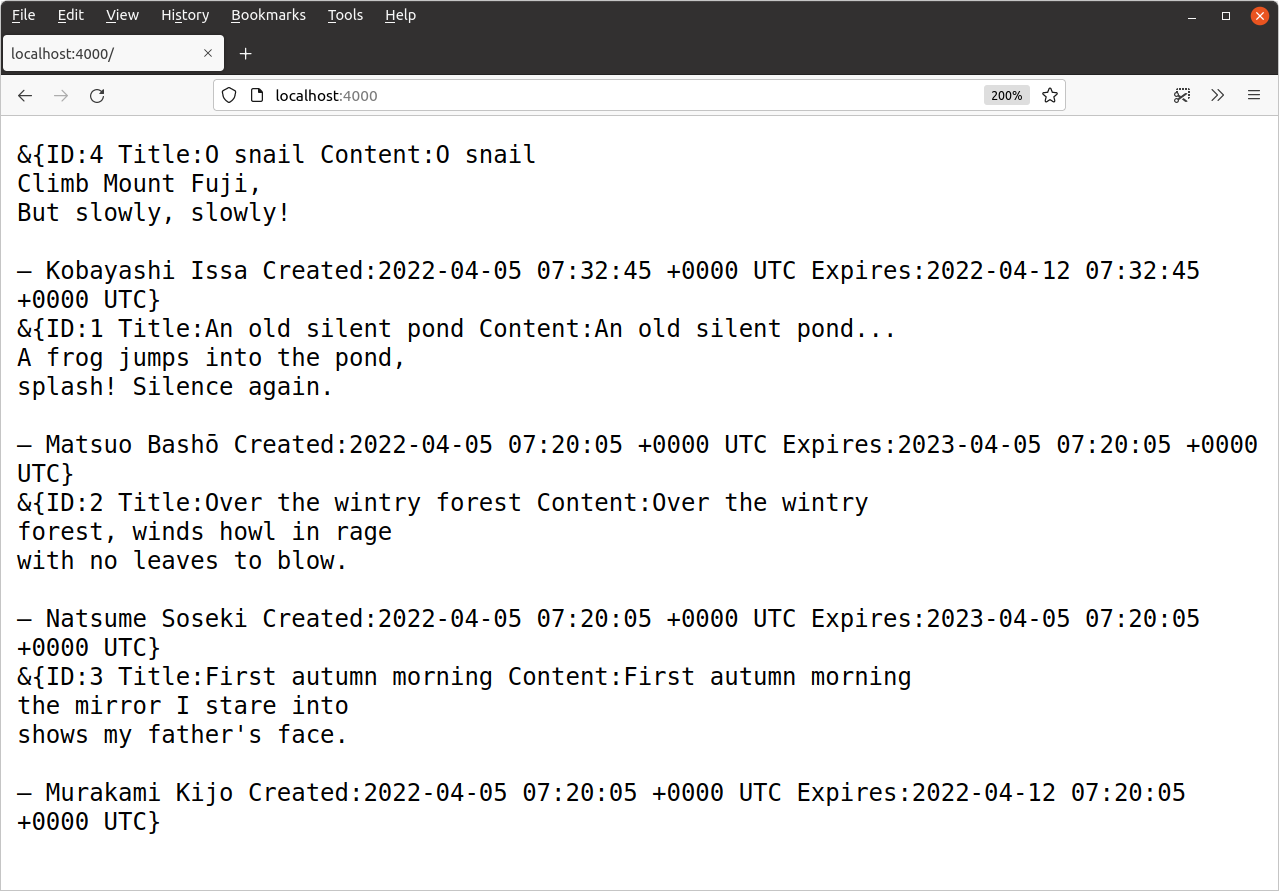
اگر اکنون برنامه را اجرا کنید و به http://localhost:4000 در مرورگر خود بروید، باید پاسخی مشابه این دریافت کنید: