دادههای پویای مشترک
در برخی از برنامههای وب ممکن است دادههای پویای مشترکی وجود داشته باشد که میخواهید در بیش از یک — یا حتی همه — صفحات وب قرار دهید. به عنوان مثال، ممکن است بخواهید نام و تصویر پروفایل کاربر فعلی یا یک توکن CSRF را در تمام صفحات دارای فرم قرار دهید.
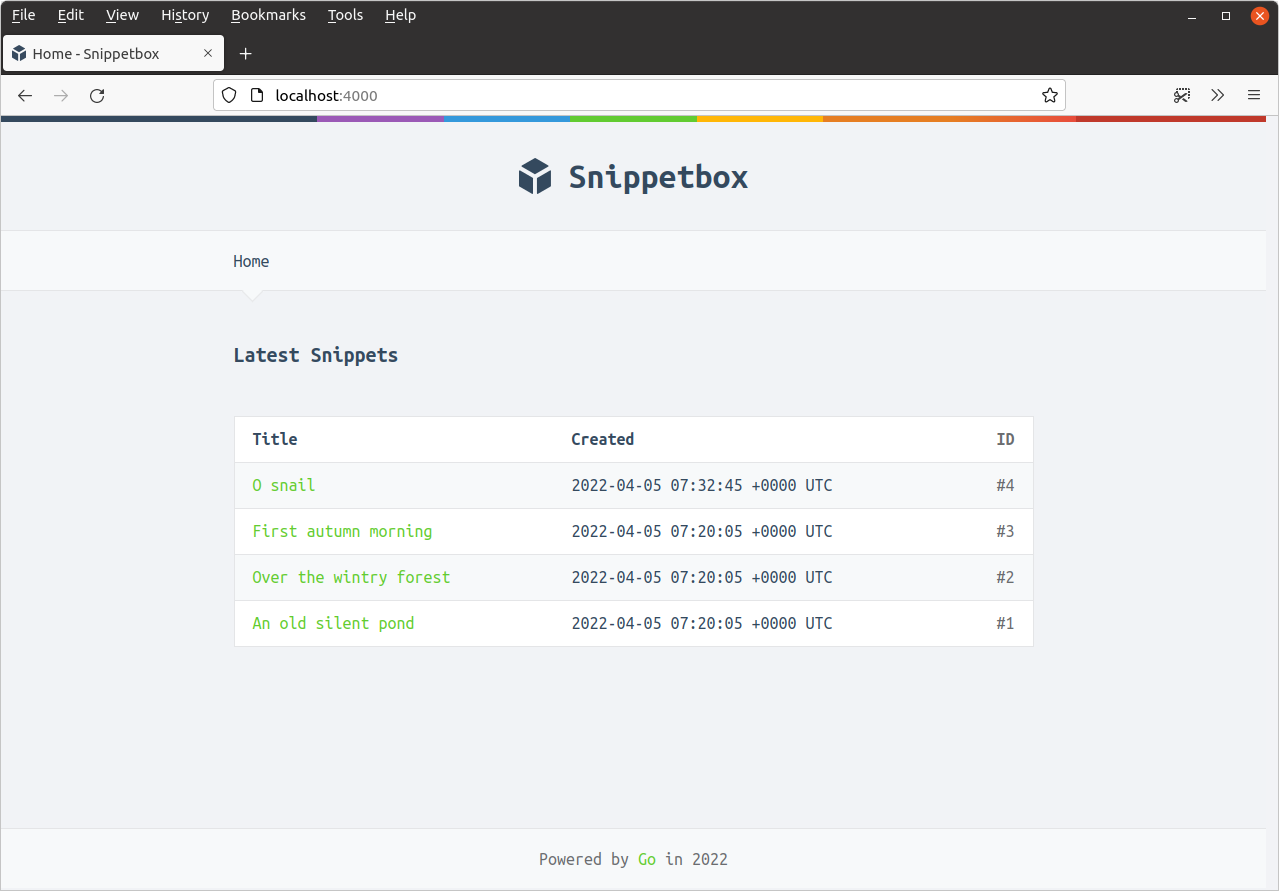
در مورد ما، بیایید با چیزی ساده شروع کنیم و بگوییم که میخواهیم سال جاری را در فوتر هر صفحه قرار دهیم.
برای انجام این کار، ابتدا یک فیلد جدید CurrentYear به ساختار templateData اضافه میکنیم، به این صورت:
package main

...

// Add a CurrentYear field to the templateData struct.
type templateData struct {
    CurrentYear int
    Snippet     models.Snippet
    Snippets    []models.Snippet
}

...
مرحله بعدی، افزودن یک متد کمکی newTemplateData() به برنامه ما است که یک ساختار templateData مقداردهی شده با سال جاری را برمیگرداند.
نمایش میدهم:
package main

import (
    "bytes"
    "fmt"
    "net/http"
    "time" // New import
)

...

// Create an newTemplateData() helper, which returns a templateData struct
// initialized with the current year. Note that we're not using the *http.Request
// parameter here at the moment, but we will do later in the book.
func (app *application) newTemplateData(r *http.Request) templateData {
    return templateData{
        CurrentYear: time.Now().Year(),
    }
}

...
سپس بیایید handlerهای home و snippetView خود را برای استفاده از متد کمکی newTemplateData() بهروزرسانی کنیم، به این صورت:
package main

...

func (app *application) home(w http.ResponseWriter, r *http.Request) {
    w.Header().Add("Server", "Go")

    snippets, err := app.snippets.Latest()
    if err != nil {
        app.serverError(w, r, err)
        return
    }

    // Call the newTemplateData() helper to get a templateData struct containing
    // the 'default' data (which for now is just the current year), and add the
    // snippets slice to it.
    data := app.newTemplateData(r)
    data.Snippets = snippets

    // Pass the data to the render() helper as normal.
    app.render(w, r, http.StatusOK, "home.tmpl", data)
}

func (app *application) snippetView(w http.ResponseWriter, r *http.Request) {
    id, err := strconv.Atoi(r.PathValue("id"))
    if err != nil || id < 1 {
        http.NotFound(w, r)
        return
    }

    snippet, err := app.snippets.Get(id)
    if err != nil {
        if errors.Is(err, models.ErrNoRecord) {
            http.NotFound(w, r)
        } else {
            app.serverError(w, r, err)
        }
        return
    }

    // And do the same thing again here...
    data := app.newTemplateData(r)
    data.Snippet = snippet

    app.render(w, r, http.StatusOK, "view.tmpl", data)
}

...
و سپس آخرین کاری که باید انجام دهیم، بهروزرسانی فایل ui/html/base.tmpl برای نمایش سال در فوتر است، به این صورت:
{{define "base"}}
<!doctype html>
<html lang='en'>
    <head>
        <meta charset='utf-8'>
        <title>{{template "title" .}} - Snippetbox</title>
        <link rel='stylesheet' href='/static/css/main.css'>
        <link rel='shortcut icon' href='/static/img/favicon.ico' type='image/x-icon'>
        <link rel='stylesheet' href='https://fonts.googleapis.com/css?family=Ubuntu+Mono:400,700'>
    </head>
    <body>
        <header>
            <h1><a href='/'>Snippetbox</a></h1>
        </header>
        {{template "nav" .}}
        <main>
            {{template "main" .}}
        </main>
        <footer>
            <!-- Update the footer to include the current year -->
            Powered by <a href='https://golang.org/'>Go</a> in {{.CurrentYear}}
        </footer>
        <script src='/static/js/main.js' type='text/javascript'></script>
    </body>
</html>
{{end}}
اگر برنامه را مجدداً راهاندازی کنید و به صفحه اصلی در http://localhost:4000 مراجعه کنید، حالا باید سال جاری را در فوتر (footer) ببینید. مانند این: